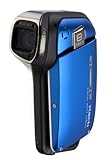
Delivery from Amazon: Securely packaged, came early.
Product Packaging:
Nice packaging, didn't have to resort to metal cutters to open like some packages these days. When you open the box everything is in proper order.
In the top compartment in the box is all the paperwork: the warranty, next was the "important warning" about the camera's waterproof feature (not deeper than 5', not longer than 60 minutes, not warmer than 104 degrees so no hot tub underwater pics), Instruction Manual, Quick Guide, safety warning about the battery charger for USA users, safety manual, software disk.
Under the paperwork compartment is the hardware: the camera, the battery, camera wrist strap, a micro USB to AV component cable, a micro USB to standard USB cable, a travel battery charger, and a protective case for the camera.
Getting started:
First disappointment was the "Quick Guide". It tells you how to take a picture and what all the buttons do. The QG mentions needing to charge the battery and even how to put the battery in the charger but it doesn't tell you how to get the battery in and out. It does tell you that it takes 90 minutes to charge the battery so at least you know when you can play with your new toy. The QG also doesn't mention needing an SD memory card or how to get it in and out. The QG has 50% of the information you would want to carry with you, so it's kind of useless.
Second disappointment was that no SD memory card is included in the box so you have to run down and buy a card before getting started if you got this as a gift. It does have 44MB of built-in memory, but that isn't going to last I have lots of SD memory cards so that isn't a problem.
The "Instruction Manual" is totally in English. The "Instruction Manual" is an improvement in that the inside of the cover has a foldout that shows you where and how to install the battery and the SD card, then how to take your first video clip and first still pictures, and finally how to play them back. The real manual is 197 pages and is really easy to use and shows lots of thought. Wish they had spent just a little time on a real quick start guide you could carry with you. When you flip the manual over, you find the Xacti Software DVD Instruction Manual which is 21 pages long. However, only the last 7 pages are about the software. It starts by telling you how to "mount" the camera on your computer, how to use it as a card reader and a PC camera (nice feature). Again, the arrangement is a little strange as there is information in this sub-manual that should have been in the main manual.
The camera:
Definitely not a shirt pocket camera. Although small, at 1.6" it is too thick and at 7 oz. too heavy to go in a shirt pocket. The protective case doesn't have belt loops or any way to clip it to the camera and only wraps around the camera so it's only function is dirt/scratch protection when you throw the camera in a purse or jacket pocket.
I'm left-handed, so I always look for ease of use for either hand. Neither hand works well with this camera, but holding it in the left hand at least gives a little leverage. The placement of the video and photo buttons causes the camera to rock whenever you push on one unless you are holding on with both hands. You just can't keep the camera stable when you are pressing the zoom, the video, or the picture buttons.
I worked my way through the manual and tested each of the features. There are two different setups for the camera to select from as far as operation: SIMPLE and NORMAL. SIMPLE is supposed to be only the minimum functions necessary to operate the camera and it puts 3 menu selections down the edge of the screen: TV which allows you to select 2 different movie and photo sizes; Select Focus Mode that lets you switch between Automatic and Macro; and finally Flash which lets you pick from auto or on or off. That's it. There are several other options that should be on the Simple menu scheme starting with access to the 9 Scene Select modes (Auto, Sports, Portrait . . . Under Water, etc.) If you switch into Normal mode, all of the camera features are available by pushing the "menu" button, but it is small and hard to hit. The menu replaces the picture on the screen, so you have to make your selection and then hit menu to get back out and see what it does. Some features that you would want to be able to access immediately are two levels down in the menus. I am not impressed with the menu system, especially when I compare it to the Canon system on their low end pocket cameras.
Videos and Pictures:
Here's where I really began to lower my opinion of the camera. It's slow to start up, slow to focus, slow to take pictures, slow to start video recording, and the zoom has one speed which is either too fast or too slow. It's 5x zoom lens going from 38mm to 190mm (35mm equivalent). It would have been more useful with a wide angle starting point, especially for underwater photos and videos.
The camera allows you to take 8 megapixel still pictures. The quality of still pictures is good and the ability to rotate the screen allows you to shoot from interesting angles. Unfortunately, it is hard to frame the pictures because what you see on the screen is not exactly what you get. The ISO goes from 50 to 1600, but above 400 the quality really falls off just as it does in most other cameras with this size sensor. The problem is getting action pictures which is why we buy a camera like this. I tried the sequential mode -- after I found it buried in the resolution selection menu. You point the camera at the action and press the button . . . then the screen goes dark until you let up or you fill the camera internal memory. A little hard to tell if you are following the action. It is a little too slow to start up and take the first picture to use for quick candid shots. When I blow the pictures up, there is a lot more noise and color shift than I see with my Canon 6 megapixal camera taking the same shot in the same light.
Video is OK , but other waterproof cameras such as the Pentax W60 offer better quality (740p) and have a more useful lens range. To give you a range, the video is not even close to my canon S3IS, but that's a whole different class of lens. However, it it fine for UTube or home videos. You can take 640x480 video at 60fps or 30fps and 320x240 at 30fps or 15fps. The 320x240 is intended for videos for the web. You can take still pictures while you are taking a video, but the resolution is not 8megapixel and is related to the video frame per second level you select. At 640x480 60fps HQ the stills are .3megapixels, at 30fps 2megapixels. Makes me think that the quality is being comprised when you shoot at 60fps and after looking at some video shot at 60 and some at 30 I determined that quality is really affected by picking 60 fps. I shot a bunch of video of our Thanksgiving dinner in normal room lighting. The camera would make adjustments slowly to the light, but when it finally got it the videos were good . . . lots of noise and artifacts, but good enough for family memory videos. I also took the camera out to our Koi pond and started it shooting above the water and then slowly moved it underwater to get pictures of our big Koi. The videos were very clear and it adjusted readily to the change to underwater light. I also tried some underwater still pictures, but those were not very satisfactory as flash washed out the pictures. When I turned the flash off I got some acceptable underwater pics.
Waterproof? The camera functioned properly underwater and didn't have a problem. After I washed it off and dried it, I open the door over the SD card/battery and found that the hinges retain water. A little blast of air cleared them, but this is a possible problem if you need to change batteries after having it in the wet. You will be changing the battery a lot, as the battery life is fairly short.
Since I am a tennis pro, I decided to test the camera in my classes. Here is where I found a great application for the camera! Took good action pics, the 5x zoom is all you need on the court, and the LCD was very clear in the sunlight. I was able to take a series of each student and then discuss it with them with no problem. I could slip the camera in my pants pocket when I wasn't using it and bring it out when needed. Much easier to use for this purpose than our Sony Handycam. Coaches could really make use of this camera as you wouldn't worry about sweat or rain or dirt. Battery life wouldn't be a problem as you typically take a short clip and then show it to the player(s) and discuss. It would be great for water polo or swimming coaches.
Bottom line on the camera: not equal to it's competitors for most uses and overly expensive. However, in certain situations like sports coaching it really is one of a kind and has great utility. I will be using this camera a lot for that purpose.
Get more detail about
Sanyo Xacti VPC-E2 Digital Camcorder and 8 MP Digital Camera (Blue).
